0

Software Backup Data Gratis

Yap X Liong Senin, 22 November 2010 , ,
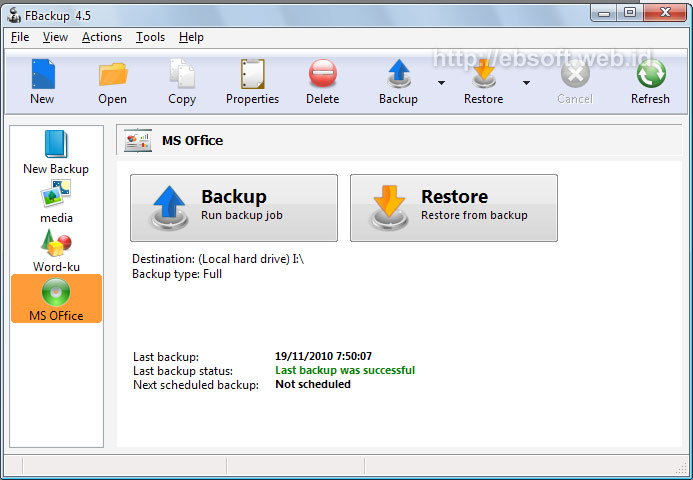
Ketika kita mempunyai data-data penting, sebaiknya kita rutin mengamankan dengan membuat backup data tersebut. Backup adalah proses meng-copy data-data penting komputer dan disimpan di tempat/folder tertentu baik dengan kompresi ataupun tidak. Sehingga jika terjadi kerusakan sistem, data hilang dan sebagainya, kita masih punya cadangannya. Jika kita mencari software backup yang gratis, user friendly dan aman, makan kita bisa menggunakan FBackup.


Sebenarnya kita bisa saja melakukan backup data secara manual, tetapi kadang proses ini tidak efektif dan seringkali kita malah lupa. Apalagi jika data yang akan di backup cukup banyak dan berada di lokasi yang berbeda-beda. Dengan FBackup kita bisa melakukan backup secara otomatis, tinggal mengatur untuk melakukan backup data pada waktu tertentu saja. Bagusnya, FBackup ini gratis baik untuk personal maupun penggunaan komersial.

0

Teacher Zhu Songhua Hot Pictures

Yap X Liong Jumat, 19 November 2010 ,
Sexy Teacher of Zhu Songhua


0

Kristen Stewart will naked

Yap X Liong Kamis, 18 November 2010 , ,
Para pencinta film TWILIGHT SAGA pastinya semakin dibuat penasaran dengan kelanjutan filmnya yang tak juga beredar. Ditambah lagi, dengan proses syuting yang sedang berjalan untuk TWILIGHT SAGA: THE BREAKING DAWN, plus rumor-rumor yang terjadi di lokasi syuting, para fansnya pun dibuat semakin tak sabar.
Dengan syuting yang sedang berlangsung di Rio, di mana sang pemeran utama, pasangan kekasih Bella Swan dan Edward Cullen berbulan madu, tak pelak kabar mengenai adegan ranjang setelah keduanya menikah beredar luas.
Alhasil, sang pemeran Bella Swan, Kristen Stewart, dikabarkan akan benar-benar telanjang sesuai dengan naskah yang ada, yang menuntutnya melakukan adegan ini di depan sang kekasih, Robert Pattinson , yang memerankan Edward Cullen.
“Naskahnya benar-benar menuntut Kristen untuk telanjang, benar-benar telanjang,” jelas salah seorang sumber terpercaya. Walaupun begitu, namun sang sutradara, Bill Condon, akan tetap berhati-hati karena dia ingin mempertahankan rating 13+ nya.
Selain kabar mengenai adegan seks, juga terdengar kabar bahwa gaun pengantin Bella tidak akan seindah yang diharapkan para fansnya.
“Gaunnya mengerikan, dan ini bukan kesalahan desainernya. Taruhlah ada seseorang yang punya kuasa atas hal ini telah memutuskan untuk memilih gaun yang benar-benar kuno dan jelek,” pungkas sumber yang sama.
Makin penasaran? Saksikan TWILIGHT SAGA: THE BREAKING DAWN :twisted:
0

Ms Access File sharing lock count exceeded

When one or more users process many transactions in a multi-user environment, the transactions may fail with the following error message: File sharing lock count exceeded. Increase MaxLocksPerFile registry entry.

Method 1: Set the registry key to MaxLocksPerFile to increase the maximum number of locks per file

  1. Click Start, and then click Run.
  2. Type regedit, and then click OK.
  3. Use the appropriate method:
    • In Microsoft Access 2000, in Microsoft Access 2002, and in Microsoft Office Access 2003 that are running on a 32-bit Windows operating system, use Registry Editor to locate the following registry key:
      HKEY_LOCAL_MACHINE\SOFTWARE\Microsoft\Jet\4.0\Engines\Jet 4.0

      In Microsoft Access 2000, in Microsoft Access 2002, and in Microsoft Office Access 2003 that are running on a 64-bit Windows operating system, use Registry Editor to locate the following registry key:
      HKEY_LOCAL_MACHINE\SOFTWARE\Wow6432Node\Microsoft\Jet\4.0\Engines\Jet 4.0
    • In Microsoft Office Access 2007 that is running on a 32-bit Windows operating system, use Registry Editor to locate the following registry key:
      HKEY_LOCAL_MACHINE\SOFTWARE\Microsoft\Office\12.0\Access Connectivity Engine\Engines\ACE

      In Microsoft Office Access 2007 that is running on a 64-bit Windows operating system, use Registry Editor to locate the following registry key:
      HKEY_LOCAL_MACHINE\SOFTWARE\Wow6432Node\Microsoft\Office\12.0\Access Connectivity Engine\Engines\ACE
  4. In the right pane of Registry Editor, double click MaxLocksPerFile.
  5. On the Edit DWORD Value dialog box, click Decimal.
  6. Modify the value of the Value data box as required, and then click OK.
Note This method changes the Windows registry setting for all applications that use the Microsoft Jet database engine version 4.0.

Method 2: Use the SetOption method to temporarily change MaxLocksPerFile

Note The sample code in this article uses Microsoft Data Access Objects. For this code to run correctly, you must reference the Microsoft DAO 3.6 Object Library. To do so, click References on the Tools menu in the Visual Basic Editor, and make sure that the Microsoft DAO 3.6 Object Library check box is selected.

The SetOption method temporarily overrides the default number of locks per file. You set the default number of locks per file when you set the MaxLocksPerFile registry key. You set the new value by using the SetOption method. The new value is valid until you close the DBEngine object. To use Method 2, follow these steps:
  1. Open Microsoft Access.
  2. Open a database, and then press Alt+F11 to launch the Visual Basic editor.
  3. On the Microsoft Visual Basic -<Database Name>-[<Module Name> (Code)] window, click Immediate Window in the View menu.
  4. In Immediate Window, enter the following code.
    DAO.DBEngine.SetOption dbmaxlocksperfile,15000
  5. Press the ENTER key to run the line of code.

    Note This temporarily sets the MaxLocksPerFile value to 15,000.
To process large transactions, set the MaxLocksPerFile value to meet your requirement, and then run the transactions in the session.

Changes you make to the MaxLocksPerFile setting by using the SetOption method are available only for the current session.


Ini pengalaman pribadi saat melakukan import dari file excel ke database Ms Access 2007. :)
0

Top Blogging Best Practices

Yap X Liong Selasa, 02 November 2010 , ,
How can you become a better blogger?
  1. Use a catchy title. Make the title unique, consider using questions and lists.
  2. Use interesting visuals. Include an image or video in your blog. This will get people’s attention and help them better understand the content of your blog.
  3. Include links. Links add depth and credibility to your articles and allow you to show a little ‘link love’.
  4. Use bullets, italics, and bold font. This makes for an easier read. Using bold font allows the reader to quickly scan your post.
  5. Let your personality come through. This is what makes your blog unique.
  6. Make blogs short, otherwise your reader might take one look at your post and bolt. If you choose to make your blog post long, consider breaking your blog into parts or use bold font to highlight the main points of the blog.
  7. Reference your articles. If you use other people’s work, include a reference or link to their article.
  8. Be interesting and have fun.
  9. Encourage comments. Engage your reader and develop a relationship with them. This can be as simple as ending your post with a question.
  10. Be bold. This might take the form of being outrageous or controversial.
  11. Post tags. This will help your readers find you.
  12. Respond to comments as soon as possible. Treat your reader like a friend. If your friend calls you and leaves a message, do you wait days to respond?
  13. Make your blog post easy to share. This may include adding widgets such as Tweet, Reddit, Delicious, Stumble Upon, etc.
  14. Post frequently. This helps keeps your blog fresh and entices search engines to index you more often.
  15. Promote your blog. This involves posting your posts to bookmarking sites, such as Stumble Upon and Delicious. Use Facebook and Twitter or other virtual communities such as LinkedIn and Craigslist (I use the ‘community’ section for this purpose).
Dear reader, what other social media best practices have worked for you?

Source: lauraleewalker.wordpress.com 
 
Copyright 2010 catatan si b4r12y
Flash Blue Blogger template by b4r12y