Tampilkan postingan dengan label Software Utility. Tampilkan semua postingan
0

Membuat Installer Windows 7 dengan FD

Cara membuat installer windows 7 dengan Flashdisk (FD) USB. Cara tutorial ini akan menggunakan sebuah software gratis yaitu koala. software ini memungkinkan untuk membuat bootable Flashdisk USB thumb drive installer untuk Windows 7, Windows Vista dan Windows Server System 2008. Kalo untuk windows XP belum dicoba.

Cara Membuat Bootable Flashdisk USB Drive Installer untuk Windows 7
Koala membuat bootable USB dari CD Windows bukan file ISO. Maka untuk menciptakan sebuah installer bootable USB thumb drive, Sobat membutuhkan komputer yang menjalankan Windows (Windows XP atau yang lebih baru), DVD untuk OS Windows yang ingin dibuat USB bootable installer (Windows 7, Vista, Windows Server System 2008) , NET framework. 2.0 atau yang lebih tinggi dan USB flashdisk dengan kapasitas min. 4 GB.

Berikut caranya :
  1. Download Koala disini. 
  2. Masukkan DVD untuk Windows 7 (atau Vista atau Windows System 2008) ke dalam optical drive PC.
  3. Masukkan flashdisk (USB thumb disk atau pen disk) dengan kapasitas 4GB ke dalam drive USB PC.
  4. Jalankan program Koala.

Software Koala
  1. Click Scan pada bagian Source untuk melakukan scan source (optical drive) OS yang akan dijadikan installer bootable USB.
  2. Click Scan pada bagian Destination untuk melakukan scan drive USB yang akan dijadikan installer bootable.
  3. Click tombol Start untuk memulai proses pembuatan installer bootable USB untuk Windows.

+/- 10 menit, sebuah installer bootable USB thumb drive sudah siap untuk melakukan instalasi Windows 7 (atau Vista, windows Server System 2008)!!!

Source: sandydoank12
0

Mempercepat Loading or Booting Windows XP

Microsoft has made available a program to analyze and decrease the time it takes to boot to WindowsXP
The program is called BootVis
  1. Uncompress the file.
  2. Run BOOTVIS.EXE
  3. For a starting point, run Trace / Next Boot + Driver Delays
  4. This will reboot your computer and provide a benchmark
  5. After the reboot, BootVis will take a minute or two to show graphs of your system startup.
  6. Note how much time it takes for your system to load (click on the red vertical line)
  7. Then run Trace / Optimize System
  8. Re-Run the Next Boot + Drive Delays
  9. Note how much the time has decreased
  10. Mine went from approximately 39 to 30 seconds
0

Uninstall Antivirus dengan AppRemover

Yap X Liong Sabtu, 04 Desember 2010 , ,

Proses uninstall software security seperti Antivirus sebenarnya tidak berbeda dengan software lainnya, tetapi tidak jarang antivirus susah di uninstall, atau kalau sudah di uninstall sering meninggalkan sisa baik file atau setting di komputer, sehingga ketika mau menginstall antivirus lainnya sering bermasalah. Untuk mengatasi hal ini, kita bisa menggunakan AppRemover.
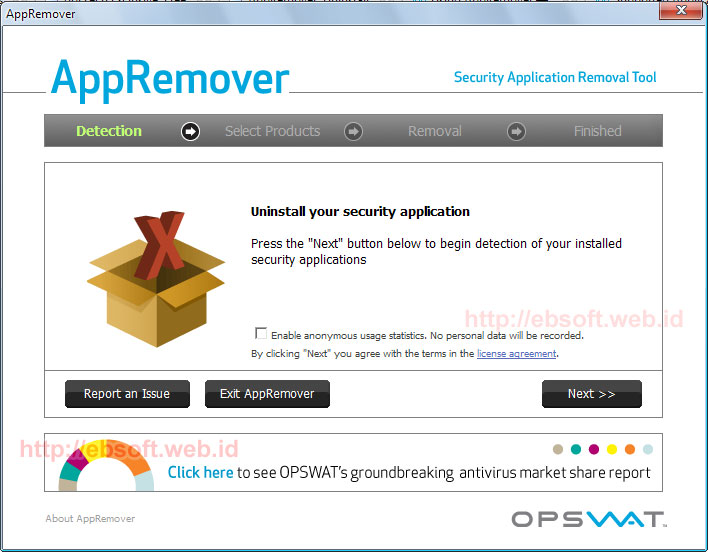
AppRemover merupakan software gratis yang di buat khusus untuk menghapus antivirus ( uninstall) yang ada di komputer dan akan berusaha membersihkan semua sisa-sisa yang biasanya di tinggalkan ketika proses uninstallasi biasa atau ketika proses uninstallasi tidak berhasil.

Selain mendukung puluhan Antivirus, AppRemover juga mampu menghapus berbagai produk Antispyware. Daftar ini juga senantiasa di update seiring dengan update software ini sendiri. Berikut beberapa produk yang didukung oleh AppRemover :
  • Avast Antivirus, Internet Security ( versi 4.8 , 5.0.x dan 5.x)
  • AVG : Antivirus, Internet Security, AntiSpyware, LInk Scanner, Identity Protection
  • Avira Antivirus: Personal, Premium, Professional
  • Bullguard Internet Security Suite
  • Quick Heal
  • CA Antivirus, eTrust
  • ESET NOD32, ESET Smart Security
  • F-Secure Antivirus, Internet Security
  • G-DAta Antivirus
  • Advanced System Care
  • Kaspersky Antivirus, Internet Security
  • Malwarebyte Antimalware
  • McAfee VirusScan
  • Microsoft Security Essentials
  • Windows Defender
  • Norman Virus Control
  • Windows Live OneCare
  • Panda Antivirus, Internet Security
  • PC Tools Antivirus
  • BitDefender Antivirus, Internet/Total Security
  • Sophos Antivirus
  • SUPERAntiSpware Free Edition
  • Symantec Antivirus 10.x
  • Norton Antvirus, 360, Internet Security
  • Trend Micro, Trustpost, VirusBuster dan lainnya

0

Search Hidden File Tool

Yap X Liong Senin, 22 November 2010 , , ,
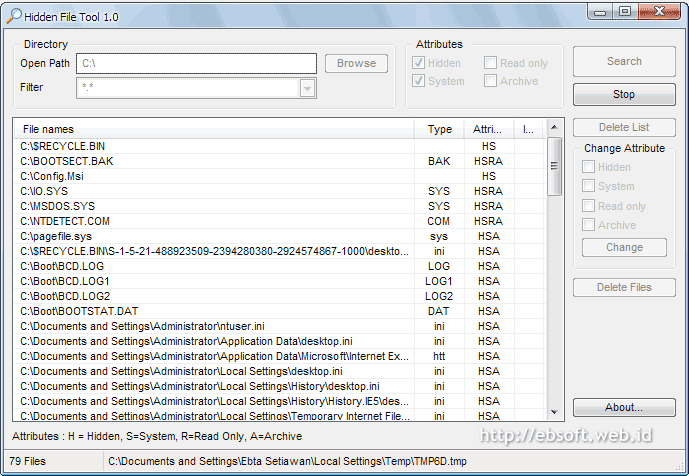
This is my freeware that maybe useful for you. Small tool and portable to search (very fast) hidden-system-archive-read only. Plus easy change the file/folder attributes. Useful when your files/folders was hidden by virus (malware), trojan etc.

Key Features :
  • Small size (only about 27 KB) and also portable
 
Copyright 2010 catatan si b4r12y
Flash Blue Blogger template by b4r12y